
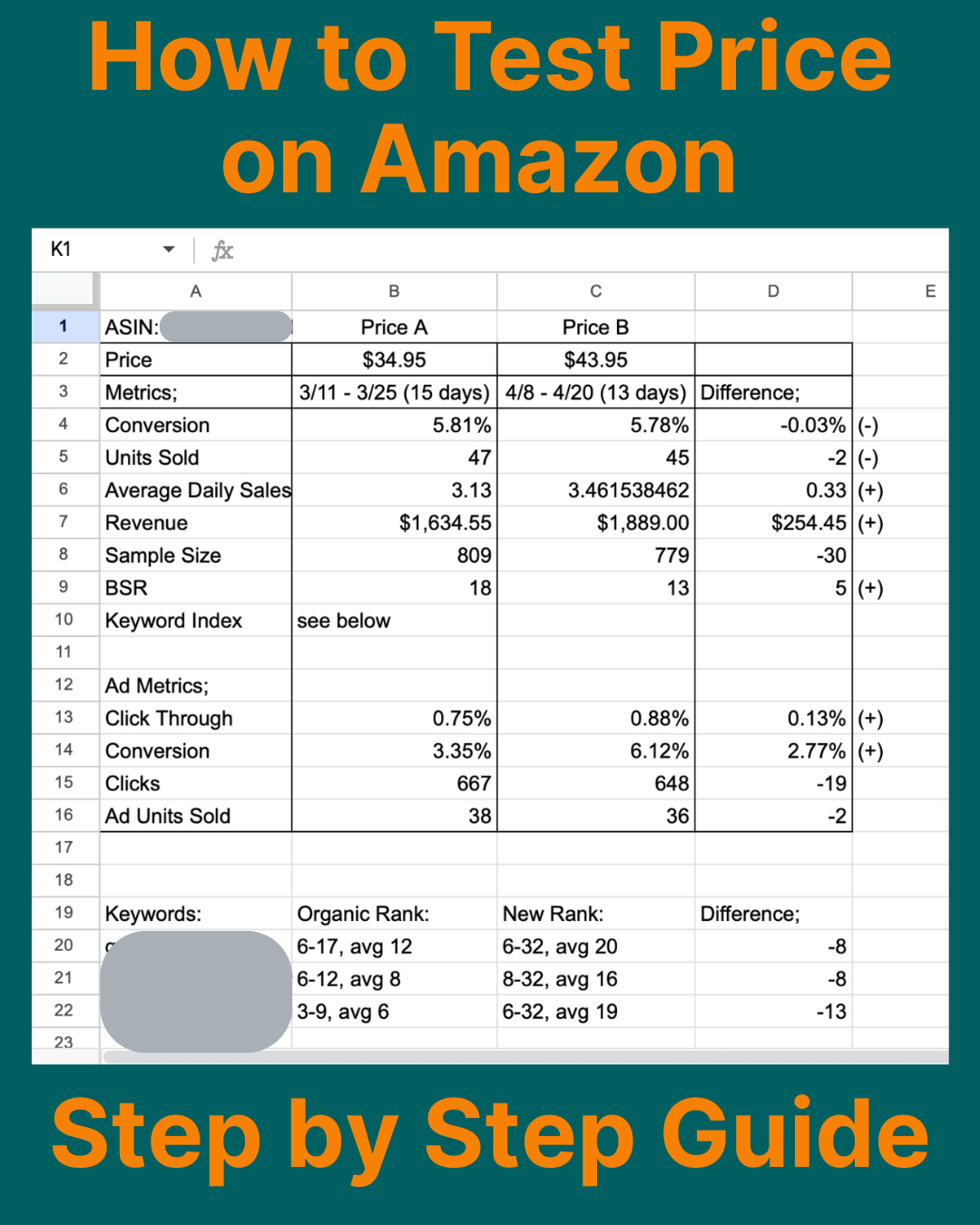
How to Test Your Price on Amazon (Step-by-Step Manual Guide)
Pricing is one of the highest-leverage decisions you can make as an Amazon seller, yet most sellers either guess, copy competitors, or change prices emotionally.
If you want to test your Amazon price properly, without destroying your ranking or misreading your data, here is the exact manual process.
This is the method I used before building ProvenPrice.
What Is Amazon Price Testing?
Amazon price testing is the process of intentionally changing your product’s price for a defined period of time, measuring performance metrics (sessions, conversion rate, sales velocity, profit), and comparing them to a matched historical period to determine which price performs better.
The key word is matched.
If you don’t control for traffic differences, reporting lag, and external factors, your conclusions will be wrong.
The 11-Step Manual Process to Test Price on Amazon
This method is free.
It just requires discipline, spreadsheets, and patience.
1. Choose Your Test Price
Pick a small but intentional change, typically 5–15% higher or lower than your current price.
Large swings introduce unnecessary risk.
Small controlled moves produce clearer data.
Example:
-
Current price: $19.99
-
Test price: $21.99 (+10%)
2. Plan the Change Timing
Change your price at midnight PST (for the U.S. marketplace).
Why? Each marketplace has a different timezone reports run on, for the US, it’s PST.
Amazon reports data in full-day cycles. Changing mid-day creates messy partial data that contaminates your analysis.
3. Decide Your Test Duration
Run the test for 1–2 weeks minimum.
This allows you to capture:
-
Weekday behavior
-
Weekend behavior
-
Advertising variability
-
Natural demand fluctuations
If results look inconclusive, extend the test.
Short tests lead to false confidence and the chance that an external factor contributed more.
4. Monitor During the Test
While the new price is live, monitor:
-
Primary keyword ranking movement
-
Competitor price changes
-
Competitor coupons or promotions
If a main competitor runs a 20% coupon mid-test, your results will be skewed.
Context matters.
5. Wait for Data to Reconcile
Amazon reporting can lag up to 48 hours.
If your test ran 7 days, wait until Day 9 before pulling final numbers.
Pulling data too early leads to inaccurate data and incomplete conclusions.
6. Pull Your Test-Period Metrics
Go to:
Business Reports → Detail Page Sales and Traffic by Child Item
Record:
-
Sessions (Unique Customer Visits)
-
Unit Session % (Conversion Rate)
-
Units Sold
-
Revenue
Then calculate:
Daily Sales Velocity = Units Sold ÷ Number of Days
Daily velocity matters less though because comparison periods may not match perfectly in length.
7. Find a Matching Comparison Period (Critical Step)
This is the step most sellers skip.
Instead of matching by calendar dates, match by sessions (unique customer visits).
Why?
Traffic changes constantly on Amazon.
Matching by sessions helps neutralize traffic differences.
Example:
If your new price ran Oct 12–18 and generated 3,500 sessions,
find a previous period at your old price that also generated ~3,500 sessions.
It does NOT need to be the same number of days.
Then record the same metrics:
-
Sessions
-
Conversion Rate
-
Units Sold
-
Revenue
-
Daily Velocity
This gives you a cleaner comparison.
8. Pull Your Advertising Metrics
From Amazon Ads Console (Sponsored Products campaigns with the ASIN), pull cumulative data for both periods:
-
CTR (Click-Through Rate)
-
CVR (Orders ÷ Clicks)
Why this matters:
A price change may affect:
-
Click behavior
-
Conversion efficiency
-
Advertising profitability
If CTR drops significantly, it could indicate pricing resistance.
9. Pull Supplemental Context Data
Use third-party tools for additional insights:
-
BSR movement → Keepa
-
Competitor price history → Keepa
-
Keyword rank movement → Helium 10, Jungle Scout, or manual tracking
Price testing does not happen in isolation.
You must understand the surrounding environment.
10. Analyze Profit Impact
For each price, calculate:
-
Unit net profit (after Amazon fees, COGS, shipping)
-
Estimated monthly net profit (if periods are equal length)
Revenue alone is not the goal.
The goal is long term profit optimization.
Meaning more profit, but not short term, that’s why we monitor factors like BSR and Keyword Rankings.
Sometimes a higher price with slightly lower volume produces more net income.
11. Compare and Decide
In a spreadsheet, compare:
-
Conversion Rate
-
Units Sold
-
Revenue
-
Daily Sales Velocity
-
Session Count
-
Ad CTR & CVR
-
Keyword Rank
-
BSR
-
Competitor Price Changes
-
Net Profit
Then decide which outcome aligns with your strategy:
-
Higher volume?
-
Higher margin?
-
Ranking growth?
-
Profit maximization?
-
Long-term brand positioning?
There is no universal “right” price, only a right price for your goals.
Common Mistakes When Testing Amazon Prices
Many sellers attempt to test price but make one of these mistakes:
-
Changing price mid-day
-
Running tests shorter than one week
-
Comparing unequal traffic periods
-
Ignoring competitor promotions
-
Pulling incomplete data
-
Measuring revenue instead of profit
If you don’t control for these, you’re not testing, you’re guessing.
Why Manual Price Testing Is Difficult
The manual method works.
But it requires:
-
Spreadsheet building
-
Data reconciliation
-
Traffic matching
-
Ad metric syncing
-
Third-party tool cross-checking
-
Constant monitoring
It’s time-intensive and easy to misinterpret.
That’s exactly why our structured Amazon price testing tool exist, to automate the process and reduce human error.
FAQ: Testing Prices on Amazon
Does raising your price hurt keyword ranking?
Not automatically. Ranking is influenced by conversion rate, sales velocity, and competitive positioning. If your conversion rate remains strong at a higher price, rankings can hold, or even improve if conversion increases or profit allows stronger ad support.
How long should I test a new price?
At least 7–14 days. This ensures you capture both weekday and weekend demand cycles.
Should I match by days or by sessions?
Match by sessions (unique customer visits) for more accurate comparisons. Traffic variability can distort results if you match strictly by calendar days.
Can you A/B test prices on Amazon?
Amazon does not provide native A/B price testing. Sellers must run sequential tests manually or use our structured testing software to automate the process.
Final Thoughts
You can absolutely test your Amazon price manually.
It works.
It just takes time, discipline, and clean data handling.
This exact process is what I used before building ProvenPrice – an automated Amazon price testing platform designed to eliminate the spreadsheet work and provide structured, controlled experiments.
Whether you test manually or use software, the key is this:
Intentional change. Controlled measurement. Clean comparison.
That’s how you turn pricing from a guess into a growth lever.
ProvenPrice is a dedicated Amazon price testing platform that automates structured price experiments for Amazon brands.